Leakhound
Findet geleakte Geheimnisse auf deinem Mac – bevor es jemand anderes tut.
14 Tage gratis testen · Kein Konto · Jederzeit kündbar
- macOS 15 Sequoia or later · 34 languages · No account needed
- Kein Konto, kein Tracking
- Funktioniert offline
- Made in Switzerland
- Sichere Zahlung über Stripe
Überblick
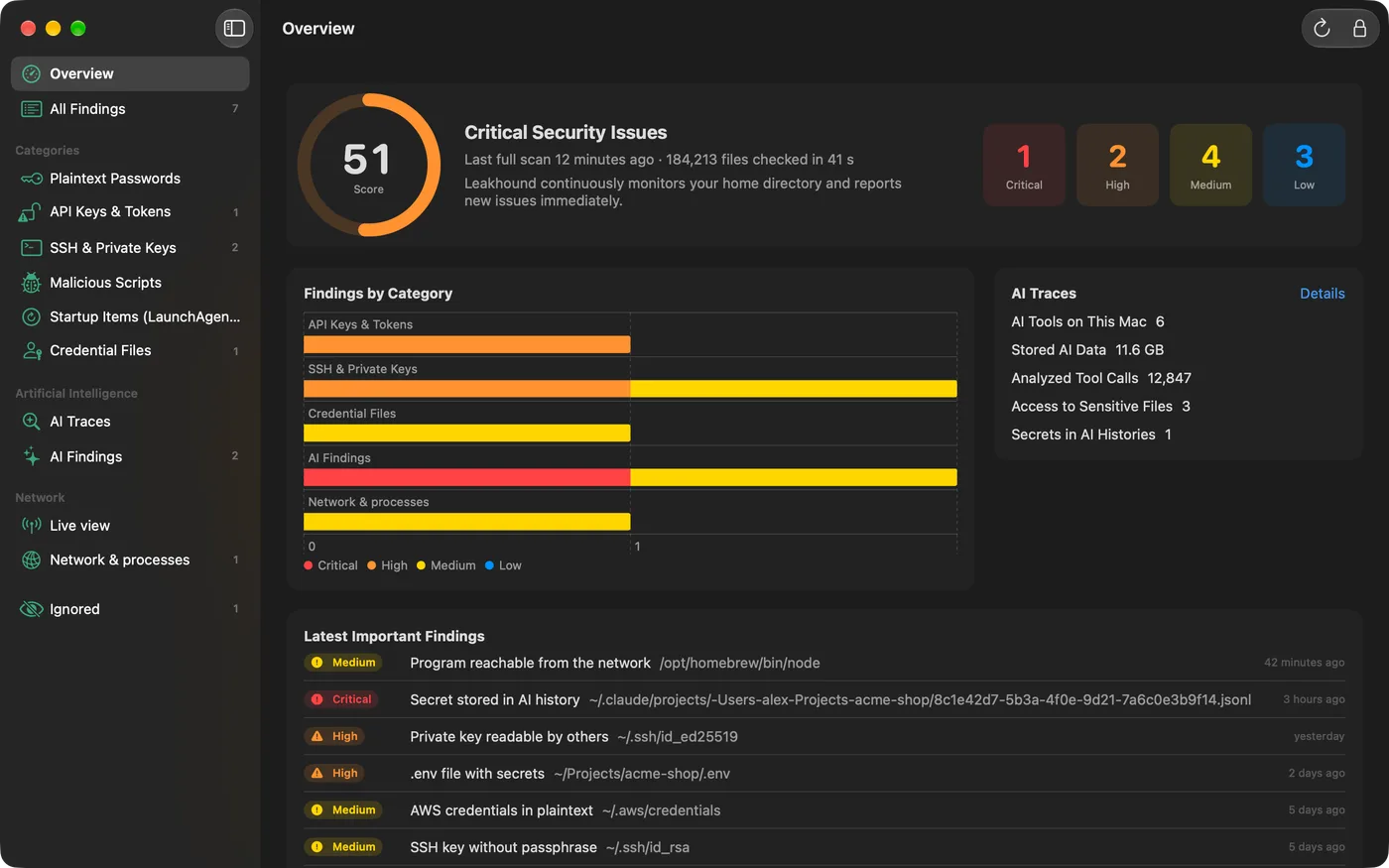
Eine Menüleisten-App, die deinen Benutzerordner laufend nach API-Schlüsseln, Klartext-Passwörtern, ungeschützten SSH-Keys, bösartigen Skripten und Spuren von KI-Assistenten durchsucht – und bei jedem Fund erklärt, warum er zählt und was zu tun ist.
Im Detail
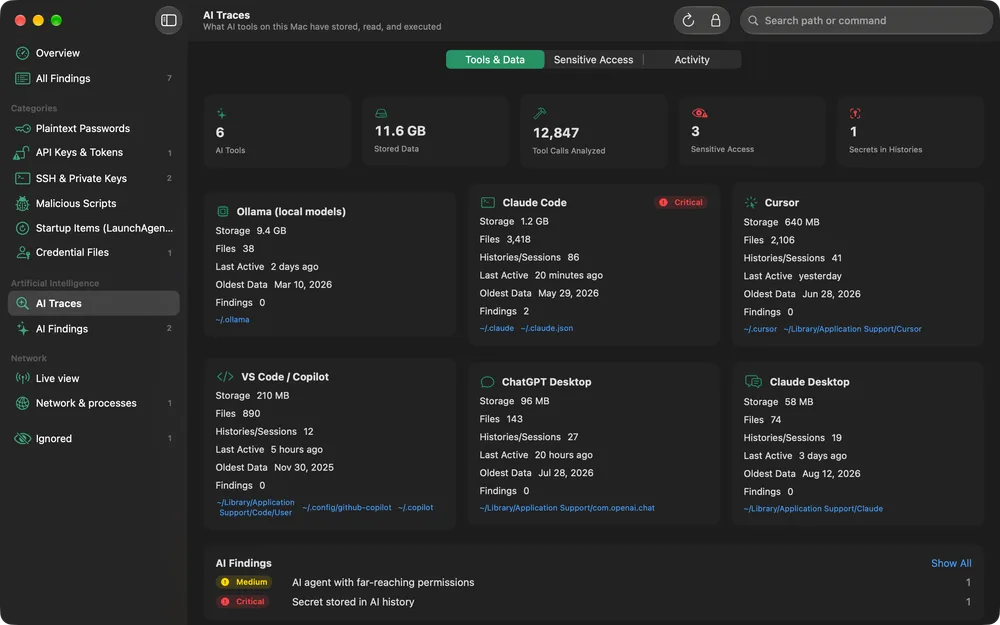
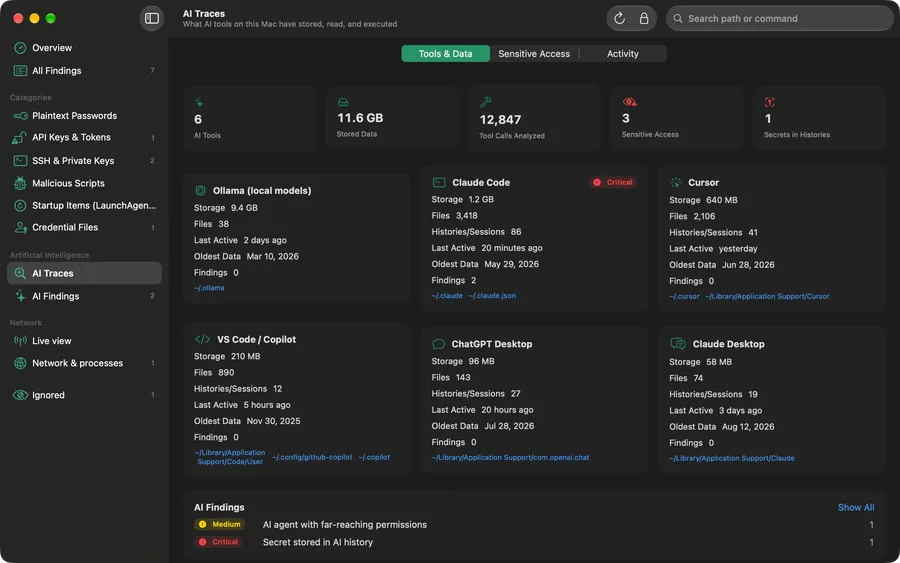
Your AI assistant remembers more than you think.
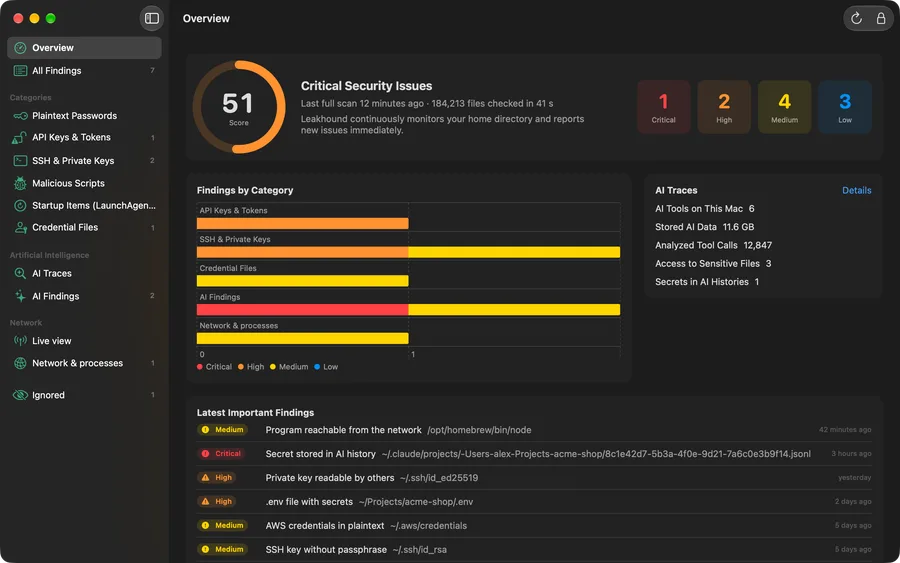
Coding agents read your .env , run shell commands and keep every session on disk — often with secrets in clear text. Leakhound analyses these local files and shows how much each tool stores, which sensitive files it read and what it ran.
Not just an alarm. A next step.
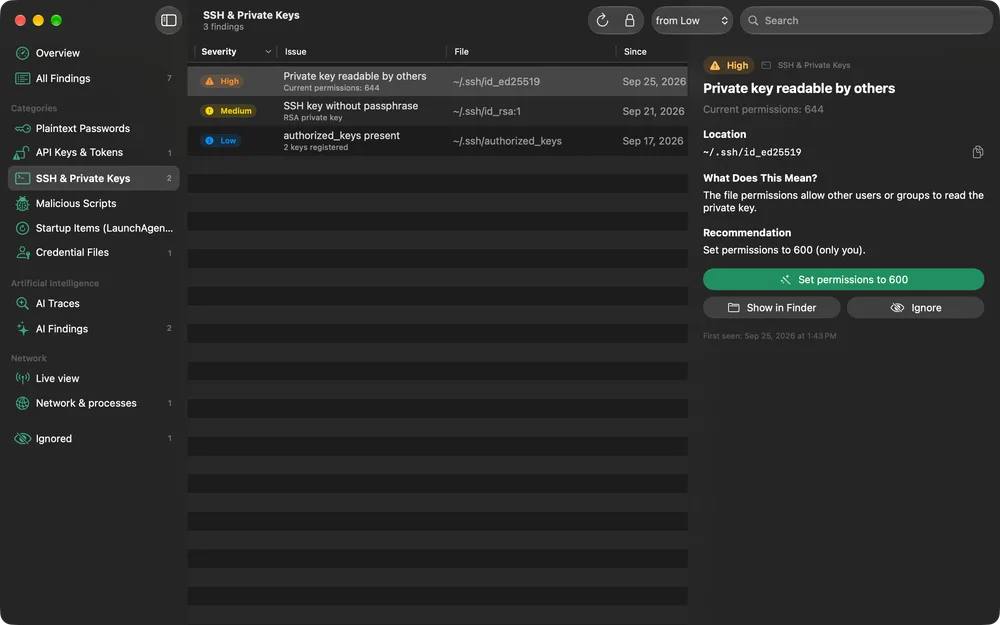
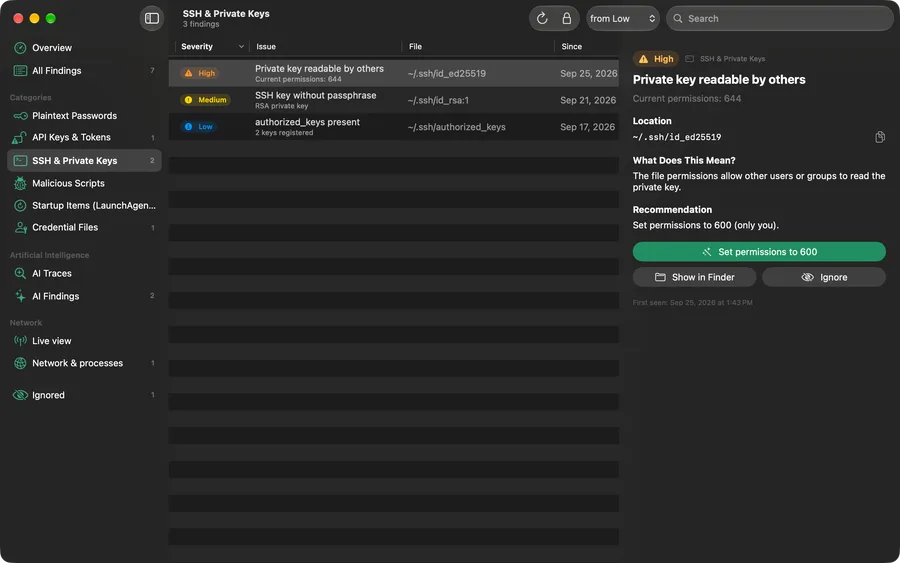
Each finding comes with a severity, the file and line, a masked snippet, a plain-language explanation of the risk and a concrete recommendation. Show it in Finder, fix permissions with one click, or ignore what you know is fine.
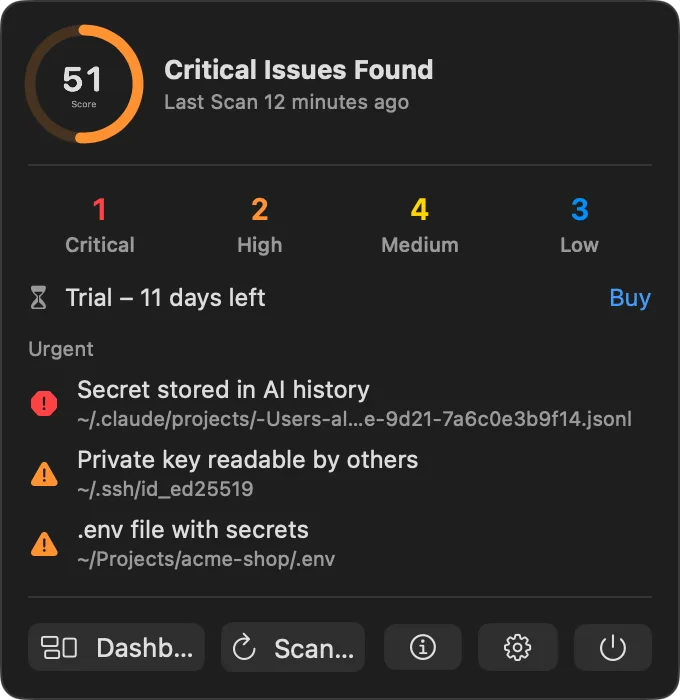
Always one click away.
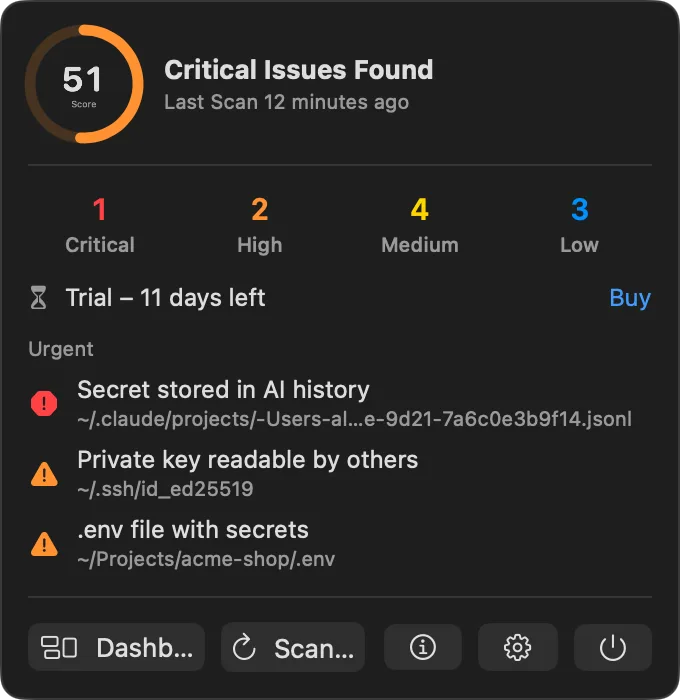
Leakhound lives in your menu bar. The icon changes colour as soon as something critical or high shows up, and the popover gives you the score, the counts per severity and the most urgent findings without opening the dashboard.
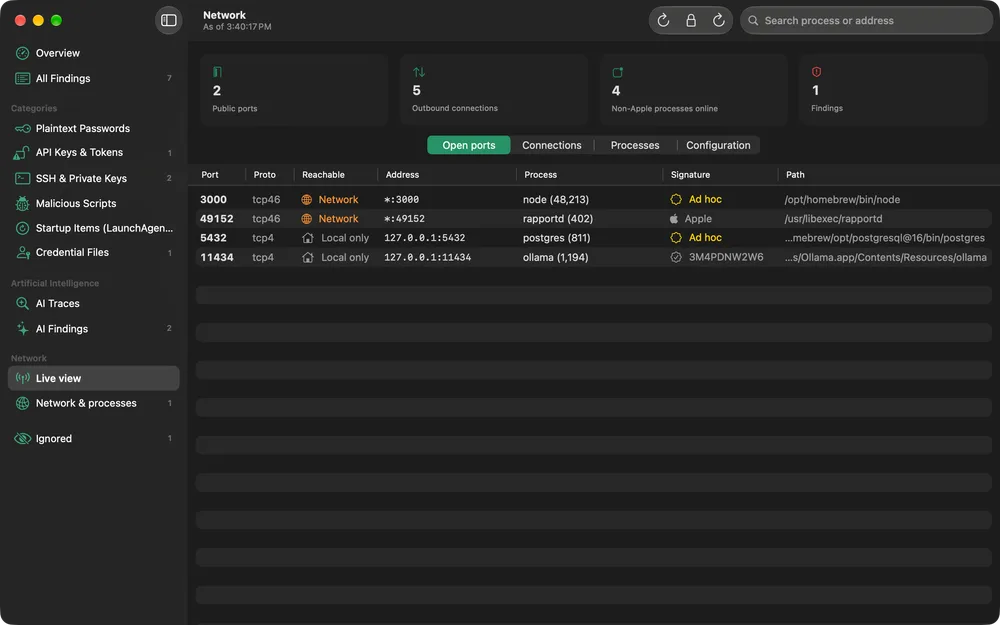
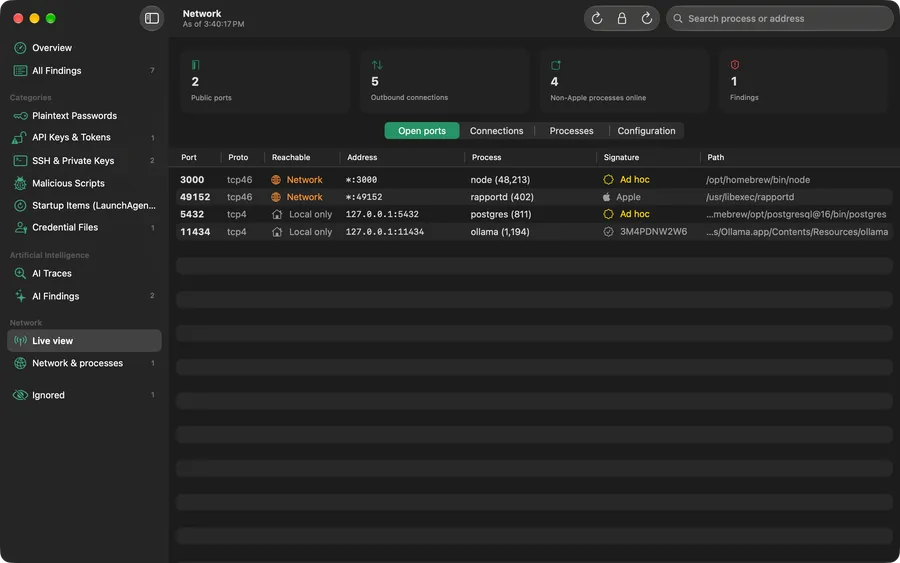
See what's listening.
A live view of open ports, outbound connections and the processes behind them — each with its code-signature status. A development server bound to all interfaces or an unsigned program with an internet connection becomes a finding, with the fix spelled out.
Alles in Leakhound.
Live monitoring
After the first full scan, Leakhound follows file changes via FSEvents and rechecks only what changed. A full scan repeats every 1 to 24 hours.
54 checks, 8 categories
Passwords, API keys and tokens, SSH keys, malicious scripts, autostart items, credential files, AI traces and network — each rated low to critical.
AI trace analysis
Finds secrets in Claude Code, Cursor or Copilot histories, risky agent permissions, and prompt injection hidden in CLAUDE.md or .cursorrules.
Explains and fixes
Every finding says why it matters and what to do. Wrong file permissions on keys and credential files are fixed with one click.
Touch ID lock
Findings show where your secrets live, so the dashboard is locked with Touch ID or your login password — and locks again when the screen locks or the Mac sleeps.
Widget & notifications
A desktop widget shows your security score and open findings. New critical and high findings arrive as a notification right away.
Screenshots
Preise
Leakhound holen.
Every feature, no account and no credit card. The trial starts in the app.
Herunterladen- Everything in the trial, without a time limit
- Up to 3 Macs per license
- License key on screen and on every invoice email
- Cancel anytime, effective at the end of the year
Prices include VAT where applicable. Secure payment with Stripe – cards, Apple Pay, TWINT. Cancel anytime, 14-day money-back guarantee.
Fragen
Does Leakhound upload my files or findings?
No. Every scan runs on your Mac. File contents, findings, paths and scan results never leave the device, and secrets are shown masked in the app. The only network request is the license check: when you activate a license and about once a day afterwards, Leakhound sends the license key, a hashed device identifier and the Mac's name to treeinspired.com. During the trial it makes no network requests at all.
Why does Leakhound ask for Full Disk Access?
It is optional. Without it, macOS asks separately before Leakhound may read Desktop, Documents, Downloads or iCloud Drive, and you only grant the folders you selected. With Full Disk Access, all folders are covered at once and Leakhound can additionally check autostart items and some AI data.
What happens after the 14-day trial?
The trial includes every feature and needs no card and no account. After 14 days you need a Leakhound Pro subscription to keep scanning: 29 per year (USD, CHF or EUR, shown in your local currency at checkout), for up to 3 Macs.
How do I get and enter my license key?
After payment, the confirmation page shows your license key, and it is also printed on every Stripe invoice email. Enter it in Leakhound to activate the Mac.
How do I cancel?
Anytime in the Stripe customer portal: Manage subscription . The cancellation takes effect at the end of the paid year. Within 14 days of your first purchase you can ask for a refund at info@treeinspired.com .
Can I move my license to another Mac?
Yes. A license works on up to 3 Macs at the same time. Deactivate it on one Mac in Leakhound to free the slot for another.
Which AI tools does Leakhound check?
Claude Code, Claude Desktop, Cursor, VS Code / GitHub Copilot, Windsurf / Codeium, OpenAI Codex CLI, ChatGPT Desktop, Gemini CLI, Continue, opencode, Ollama and LM Studio. Leakhound only reads their local files; it never sends anything to an AI service.
Is Leakhound an antivirus?
No. Leakhound finds exposed secrets and risky configurations using known patterns and flags typical malware techniques in scripts and autostart items. It complements, but does not replace, an antivirus or EDR product or a professional security audit.
Which languages does Leakhound speak?
34 languages, including English, German, French, Italian, Spanish, Portuguese, Dutch, the Nordic languages, Polish, Czech, Turkish, Russian, Ukrainian, Arabic, Hebrew, Hindi, Japanese, Korean and Chinese. The app follows your macOS language.
Why is Leakhound not in the Mac App Store?
A scanner that reads your whole home folder and watches it live does not fit inside the App Store sandbox. Leakhound is distributed directly, signed with treeinspired GmbH's Developer ID and notarized by Apple.